Get your time back.

HourBack gradually lowers your screen time, blocks the apps that eat your day, and builds the habits that keep the time yours.

  • No account needed
  • Your data stays on your phone
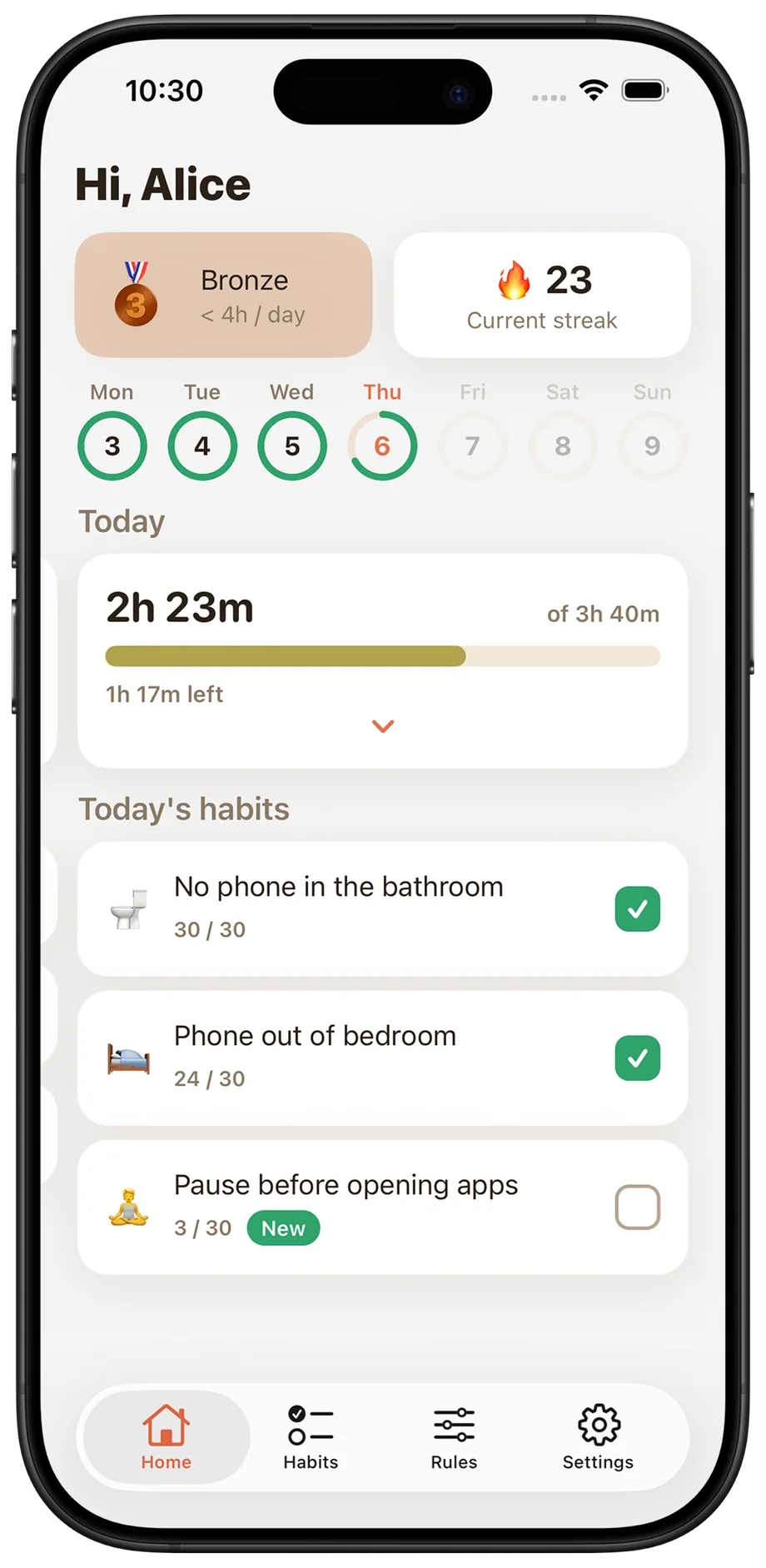
The HourBack home screen: today's usage measured against a 3h 40m daily limit, a 23-day streak, and today's habits.
The habit program

Change your habits, one at a time.

You don't need a perfect routine overnight. HourBack gives you practical habits one at a time, starting with the easiest changes that make the biggest difference.

Mute social notificationsVery easyWithout the constant pings you'll reach for your phone far less out of reflex.
Clean home screenEasyA little friction is enough to break the auto-open habit.
No phone in the bathroomEasyThose quick trips quietly turn into ten-minute scrolls more often than you'd think.
Phone out of the bedroomMediumKills late-night scrolling and the first-thing-in-the-morning grab.
Delete your worst appHardUse it in the browser instead, the clunkier version does the limiting for you.
Charge across the roomHardThe tiny bit of effort is a surprisingly strong deterrent.

And so much more

HourBack habit library, with habits tagged by difficulty, and a habit's detail page
Rules

When time's up, the apps close.

Set a daily limit, choose what gets blocked, and decide when the rules apply. HourBack puts a little friction between you and the apps that keep stealing your time.

Apps and categoriesBlock specific apps or entire categories like Social and Games.
Daily limitOne daily budget for the apps you choose, gradually lowering each week.
SchedulesKeep distracting apps off during sleep, work, dinner, or whenever you need to be present.
Pause, then unlockNeed in? Wait 30 seconds, then choose 1, 5, or 10 minutes.
Strict modePremiumNo escape hatch. Blocked apps stay blocked until the rule lifts.
Per-app limitsPremiumGive your worst offenders a limit of their own.
HourBack Rules screen showing the daily limit, blocked app selection and schedules
The dashboard

Your whole day, on one screen.

Your screen time, today's limit, habits, and progress come together in one place. Know how you're doing today, and see the change adding up over time.

  • Today's usage, against your limit in real time.
  • Your habits, ready to check off as you build them.
  • Your streak and level, always within reach.
  • Your past days, so you can see the progress you've made.
HourBack home screen showing today's usage against the daily limit, streak and habit checklist
Progress

Every Sunday, the week you actually had.

A recap lands when the week closes: what you checked off, how many days you showed up, and the new, slightly lower limit you're carrying into Monday. The calendar keeps every one of them.

  • A month-by-month calendar of every day you completed.
  • Level-ups land on the Sunday you earn them.
  • Next week's limit, set for you as the week turns.
HourBack weekly review showing a level-up with the week's stats, and the progress calendar
Levels

Use less. Rise higher.

You don't have to change your screen time overnight. HourBack starts from where you are and gradually lowers your limit each week. As your screen time falls, you rise through the ranks, from Clay to Legend.

Your first five weeks

Legendunder 30m / day
Eliteunder 1h / day
Diamondunder 1h 30m / day
Platinumunder 2h / day
Goldunder 2h 30m / day
Silverunder 3h / day
Bronzeunder 4h / day
Ironunder 5h / day
Stoneunder 6h / day
Woodunder 7h / day
Clayover 7h / day
Pricing

Start free. Go Premium when you want the lock.

Free

$0
  • Daily limit that lowers automatically every week
  • Block any apps and categories you choose
  • Up to 2 blocking schedules
  • The full habit program, streaks and levels
  • Weekly review and progress calendar
Download HourBack

Premium

$3.33/ month, billed yearly at $39.99
  • Everything in Free
  • Strict mode: apps can't be unblocked early
  • Unlimited blocking schedules
  • Per-app daily limits for your worst offenders
Start your free trial
FAQ

Questions, answered honestly

How is this different from Apple's Screen Time?

Screen Time shows you a number and lets you set a limit you can dismiss in one tap. HourBack gives you a plan: it starts at your real usage, lowers your limit week by week, puts a 30-second pause between you and any unlock, and pairs the blocking with a guided habit program so the change actually sticks. It's built on the same Apple technology, it just does the part Apple leaves to your willpower.

Can I get past a block if I really need to?

Yes, unless you don't want to. By default, hitting a block opens a 30-second countdown you can't skip; after it, you can unlock the apps for 1, 5 or 10 minutes. Turn on Strict mode and that escape hatch disappears entirely, blocked apps stay blocked until the limit or schedule lifts on its own.

Does HourBack see what I do on my phone?

No. Your screen time is read through Apple's Screen Time framework, which keeps the data inside a sandbox on your device that developers cannot read. HourBack has no servers, no accounts and no analytics, everything you set up lives on your device.

What do I get for free?

The daily limit with automatic weekly reductions, app and category blocking, up to two schedules, the full habit program, levels, streaks, the weekly review and the progress calendar. Premium adds Strict mode, unlimited schedules and per-app daily limits.

How much does Premium cost?

$39.99 a year (that's $3.33 a month, a 44% saving) or $5.99 a month. Both start with free trial, and you can cancel any time from your Apple ID settings.

Do I need an account?

No. There's no sign-up, no email and no password. You open the app, tell it your name, and start.

What happens if I delete the app?

The blocks stop and everything stored on your device goes with it, your limit, habits, streaks and history. Since nothing is on a server, there's nothing to delete anywhere else, and nothing to restore if you reinstall.

Still wondering something? Email us, a real person replies.
Spend more time living

Free to start, no account to create, and your data never leaves your phone. Your first hour back is one download away.

Download on theApp Store